How to Download TikTok Videos Without Watermark Using SaveTik
TikTok is a hub for millions of creative videos every day. However, when downloading directly from the app, content often comes with the TikTok logo and user ID. If you want to save high-quality videos for offline viewing or personal collection, SaveTik helps you download TikTok videos faster and more conveniently.
SaveTik is an online TikTok video downloader that works entirely in your web browser. You don't need to install software, register an account, and can use it on your phone or computer with just a few simple steps.
Steps to download TikTok videos using SaveTik:
Step 1: Copy the TikTok video link
Open the TikTok app or visit TikTok.com, find the video you want to download. Tap Share and select Copy link to get the video URL.
Step 2: Paste the link into SaveTik
Visit SaveTik.ai using your mobile or desktop web browser. Paste the copied TikTok link into the input box and click the Download button.
Step 3: Wait for the system to process
SaveTik will automatically analyze the link and prepare suitable download options in just a few seconds.
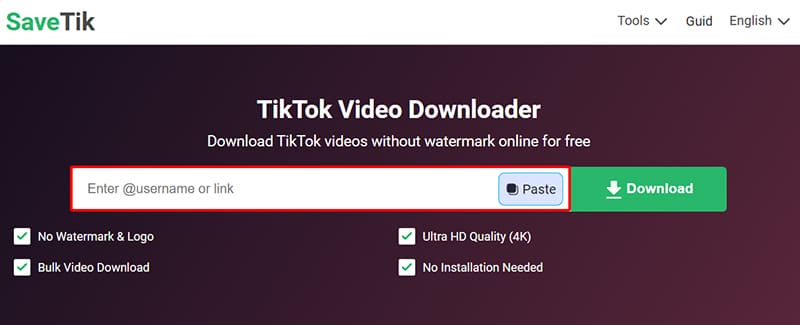
Step 4: Save the video to your device
Select the desired video quality and click Download to save the video to your phone or computer.
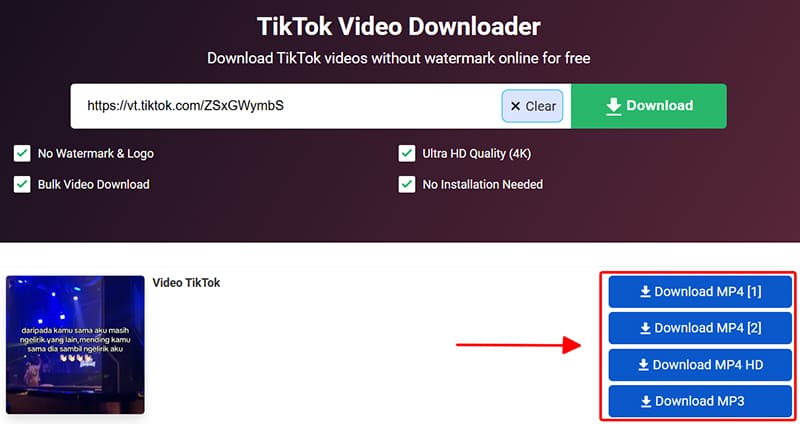
Tips for using SaveTik more effectively
- Support on all devices: SaveTik works well on Android, iPhone, iPad, Windows, macOS, and popular browsers like Chrome, Safari, Edge, or Firefox.
- Video save location: Usually, downloaded videos are saved in the device's default Downloads folder. If you can't find the file, you can check your browser's download history.
- No app installation required: All operations are performed directly in the web browser, saving device storage space and making it more convenient to use.
Notes when using downloaded content
SaveTik is a tool that supports downloading content from TikTok for personal use and offline storage. Users should respect intellectual property rights and ensure that the use of content complies with copyright regulations and the platform's terms of service.